

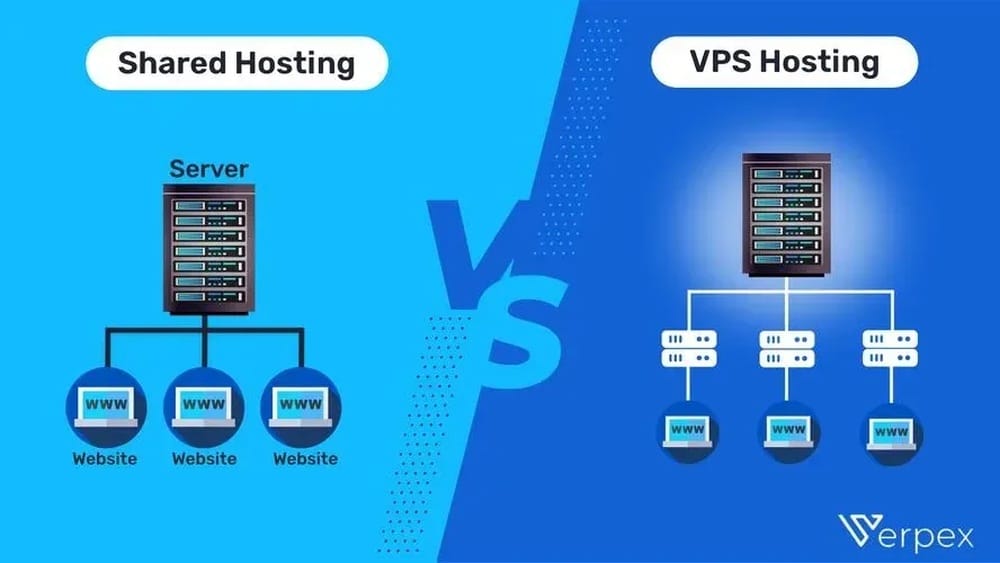
When you want to build a website, choosing the right type of hosting is one of the first—and most important—decisions you will make. The hosting you pick affects your website’s speed, security, and ability to grow. Two of the most popular options are VPS hosting and shared hosting. But what do these really mean? And which one is better for your needs? Many beginners get confused by technical terms, prices, and promises from hosting companies. This article will break everything down in clear, simple language, helping you make a confident choice for your website’s future.
What Is Shared Hosting?
Shared hosting is the most common entry-level hosting service. With shared hosting, your website sits on a server with many other websites. All these sites use the same server resources—like memory, CPU power, and disk space.
This setup is like living in an apartment building where everyone shares the kitchen, laundry, and garden. It’s affordable and easy to start, but you don’t have much control.
How Shared Hosting Works
When you sign up for shared hosting, the provider puts your site on a server with hundreds (sometimes thousands) of others. Each site gets a small part of the server’s resources.
If one website suddenly uses a lot of resources (for example, it gets a traffic spike), other websites might slow down. You also have limited access to server settings or customizations.
Key Features Of Shared Hosting
- Low cost: Usually the cheapest hosting option.
- Beginner-friendly: Simple setup, often with one-click installers.
- Limited resources: You share everything with other users.
- Basic support: Most providers offer help for common issues.
- One control panel: Usually cPanel or a custom dashboard.
Who Should Use Shared Hosting?
Shared hosting is best for:
- New websites or blogs with low traffic
- Personal pages or hobby projects
- Small business sites that don’t need advanced features
If you expect to grow quickly or need special software, shared hosting may not be enough.
What Is Vps Hosting?
VPS stands for Virtual Private Server. This hosting option gives you a slice of a physical server, but with your own dedicated resources. Think of it as living in a townhouse—you share the building, but you have your own private space.
How Vps Hosting Works
A physical server is divided into several virtual servers using special software called a hypervisor. Each VPS acts like an independent server, with its own operating system, memory, CPU, and storage. Your resources are guaranteed and not shared with others.
With a VPS, you can install software, change settings, and even restart your server if needed. It’s more flexible and powerful than shared hosting.
Key Features Of Vps Hosting
- Dedicated resources: You get your own part of CPU, RAM, and disk.
- Root access: Full control over server settings and software.
- Scalability: Easy to upgrade if your website grows.
- Better security: Your environment is isolated from others.
- More technical: You may need some server knowledge.
Who Should Use Vps Hosting?
VPS hosting is great for:
- Growing businesses or busy websites
- Online stores with secure payments
- Developers testing custom software
- Sites needing special configurations
If you want more power, security, or control, a VPS is a smart step up from shared hosting.

Credit: blog.resellerspanel.com
Comparing Vps And Shared Hosting: Key Differences
Choosing between VPS and shared hosting can feel tricky. The differences matter a lot for your site’s speed, safety, and flexibility.
Here is a side-by-side comparison to help you see the main contrasts:
| Feature | Shared Hosting | VPS Hosting |
|---|---|---|
| Price | Lowest ($2–$10/month) | Higher ($15–$80/month) |
| Resources | Shared with all users | Dedicated and guaranteed |
| Performance | Can slow down if others overuse | Stable, faster, more reliable |
| Customization | Very limited | Full root access; high flexibility |
| Security | Basic; risk from other users | Isolated; stronger protection |
| Technical Skill Needed | Beginner-friendly | Some server knowledge needed |
| Scalability | Hard to upgrade | Easy to scale up |
Performance
On shared hosting, your site’s speed can drop if another website on the same server gets busy. This is called the “bad neighbor effect.” With VPS, you get your own resources, so your site stays fast even if others get busy.
Security
Shared hosting is more open to risks because a problem on one site can affect others. On a VPS, you’re isolated, so your files and data are safer from other users’ mistakes or attacks.
Customization
Most shared hosting plans limit what you can install or change. You’re stuck with standard software. With a VPS, you control the operating system, can install special tools, and can even run your own security programs.
When Should You Choose Shared Hosting?
Many people start with shared hosting because it’s simple and cheap. But it’s not for everyone.
When Shared Hosting Makes Sense
- Tight Budget: If money is your main concern, shared hosting lets you get online for just a few dollars a month.
- Simple Websites: For basic blogs, portfolios, or small business sites, you probably don’t need more power.
- No Technical Skills: Shared hosting companies handle server management, so you can focus on your content.
- Low Traffic: If you expect fewer than 5,000 monthly visitors, shared hosting usually performs well.
Practical Examples
- A student making a resume website
- A local bakery with a simple menu and hours
- A personal blog with a few hundred readers
Non-obvious insight: If you plan to use WordPress, many shared hosts offer optimized setups and free themes, making it even easier to start.
Another insight: Some shared hosts allow “unlimited” websites, but these plans often have hidden limits on resources. If you add many sites, performance drops quickly.
When Should You Choose Vps Hosting?
VPS hosting is the next step up. It costs more, but you get more control, speed, and security.
When Vps Hosting Is The Right Choice
- Growing Website: If your site is getting more than 5,000 visitors per month, you’ll notice speed problems on shared hosting.
- Custom Software: If you need to install special apps, run game servers, or host private databases, a VPS gives you the freedom.
- Better Security: If you handle payments or private data, a VPS lets you set up firewalls and install security patches quickly.
- Frequent Downtime: If your site keeps crashing on shared hosting, it’s time to upgrade.
Practical Examples
- An e-commerce site with daily sales
- A SaaS company hosting client dashboards
- A developer testing web apps before public launch
Non-obvious insight: Many VPS plans offer “snapshots”—you can save your server’s state before big changes. If something breaks, you can roll back instantly.
Another insight: Some VPS providers offer “managed VPS” services. This means the company handles server updates and security, so you don’t need to be a technical expert.
Performance: Speed, Uptime, And Reliability
Website speed is vital for users and search engines. Visitors leave slow sites quickly, and Google ranks fast sites higher.
Shared Hosting Performance
Most shared hosting plans promise 99.9% uptime. But real performance depends on how many sites are on your server and how they behave. If another site on your server gets a lot of traffic or is hacked, your site can slow down or even crash.
Shared hosting often limits how many files you can have (called “inodes”), your monthly traffic (“bandwidth”), and sometimes even how many emails you can send.
Vps Hosting Performance
With a VPS, your resources are reserved. Your site loads faster and can handle sudden traffic spikes better. Most VPS hosts use SSD storage, which is much faster than old spinning hard drives.
Some VPS providers allow you to choose your data center location. Picking a server close to your main audience can improve loading times.
Real-world Example
A small blog might run fine on shared hosting at 2 seconds per page load. But if the blog gets featured on a big site and 10,000 people visit in one day, it could crash. On a VPS, the same spike might slow the site down, but it won’t crash—your resources are protected.
Security: Protecting Your Website And Data
Security matters more than ever. Hacks, malware, and data leaks are common. Your choice of hosting affects how safe your site is.
Shared Hosting Security
You’re only as safe as your “neighbors. ” If another website on your server is hacked, attackers might get access to your files. Shared hosting plans rarely let you install custom security tools or firewalls.
Some providers offer daily backups and basic malware scanning. But you have limited control over how often backups happen or how fast problems are fixed.
Vps Hosting Security
With a VPS, your files are kept separate from other users. You can install advanced firewalls, monitor traffic, and set up SSL certificates for extra safety. You control when to apply security updates.
If you handle customer data (like credit cards or personal info), a VPS can help you meet privacy laws and standards, such as PCI-DSS for online stores.
Non-obvious insight: Some VPS hosts offer “DDoS protection.” This helps keep your site online during large attacks, but it’s not always included by default—ask your provider.
Another insight: VPS users must remember to update their software. Outdated apps are a common way hackers get in. Consider “managed VPS” if you want experts to handle this for you.
Cost Comparison: What Will You Really Pay?
Price is often the first thing people look at, but the cheapest option isn’t always the best value.
Typical Shared Hosting Costs
- Basic plans: $2–$5/month
- “Unlimited” or premium plans: $6–$15/month
Shared hosting often includes free website builders, email, and SSL certificates. But renewal prices are usually higher after the first year.
Typical Vps Hosting Costs
- Entry-level: $15–$25/month
- Mid-range: $30–$60/month
- High-end managed VPS: $80+/month
VPS plans may charge extra for backups, control panels, or premium support. Managed VPS is more expensive but includes server maintenance.
Cost-performance Table
Here’s a rough idea of what you get for your money:
| Hosting Type | Entry Cost | Renewal Cost | Value |
|---|---|---|---|
| Shared Hosting | $2–$5/month | $7–$15/month | Best for simple sites |
| VPS Hosting | $15–$25/month | $25–$80/month | Best for growing or complex sites |
Non-obvious insight: Some hosts offer “introductory” pricing that looks very cheap. Always check the renewal price. The cost can double or triple after the first year.
Another insight: Shared hosting often bundles features you may not need, while VPS lets you pay only for what you use.

Credit: www.temok.com
Scalability: Can Your Hosting Grow With You?
Many sites start small but grow over time. If you outgrow your hosting, moving can be hard.
Shared Hosting Scalability
Most shared plans have strict limits. If your site gets popular, your host might slow down your site (“throttle” it) or even suspend your account.
Upgrading usually means moving to a VPS or dedicated server—sometimes a complicated process.
Vps Scalability
VPS hosting is built for growth. You can usually add more RAM, CPU, or storage with a few clicks. Some VPS plans offer “auto-scaling,” where resources adjust based on real-time traffic.
If you expect your site to grow, starting on a VPS can save you time and trouble later.
Non-obvious insight: Some VPS providers let you clone your server to create staging/testing environments easily, a feature rarely found on shared hosting.
Management: How Much Work Is Involved?
Managing your hosting can be simple or complex, depending on the type you choose.
Shared Hosting Management
- Automatic updates: Host handles server patches and security.
- Easy control panel: Usually cPanel or a similar tool.
- Limited access: Can’t change server settings or install advanced software.
Most tasks are point-and-click, making it great for beginners.
Vps Hosting Management
- Full root/SSH access: You control everything.
- Manual updates: You (or your IT team) must manage security patches.
- Custom setups: Install any software you need.
Some VPS hosts offer “managed” plans, where they handle server work for you. This costs more but saves time and reduces risk.
Non-obvious insight: Some control panels (like Plesk or cPanel) are available for VPS, but may cost extra. Always check if your plan includes a control panel.

Credit: www.inmotionhosting.com
Support: Getting Help When You Need It
Good support can save you hours of frustration. The level of help varies by hosting type.
Shared Hosting Support
Most shared hosts offer 24/7 support via chat or tickets. Support teams can help with basic issues—like email setup or restoring a backup—but not with coding or advanced server settings.
Vps Hosting Support
Unmanaged VPS plans often have limited support. Managed VPS plans include help with server updates, security, and software installs.
If you’re not comfortable with server admin, choose a managed VPS or stick with shared hosting.
Non-obvious insight: Ask if the host offers phone support or only chat/email. For urgent problems, live phone help can be a big advantage.
Which Hosting Type Is Best For You?
Choosing between VPS and shared hosting depends on your needs, budget, and future plans.
- For new, small, or personal sites, shared hosting is simple and affordable.
- For growing businesses, busy blogs, or online stores, VPS offers better performance, security, and control.
If you’re unsure, start with shared hosting. When your site grows, you can upgrade to VPS or even dedicated hosting later.
Pro tip: Some hosts offer free migrations if you upgrade, making it easier to move as your site expands.
Common Mistakes When Choosing Hosting
Many beginners make the same errors when picking a hosting plan:
- Only looking at price: Cheaper is not always better. Consider support, performance, and security.
- Ignoring renewal rates: Intro prices are low, but renewals may be expensive.
- Overestimating “unlimited” plans: These often have hidden limits on storage, bandwidth, or CPU.
- Not reading the terms: Some hosts limit email, backups, or file types.
- Forgetting about backups: Always check if your plan includes automatic daily backups.
Real-world Hosting Providers
Some of the most popular shared hosting providers include Bluehost, HostGator, and SiteGround. For VPS hosting, many people use DigitalOcean, Linode, or Vultr.
For a deeper look at the differences, and more details on hosting technology, you can check Wikipedia’s web hosting service page.
Summary Table: Shared Vs Vps Hosting At A Glance
Here’s a quick summary to help you decide:
| Shared Hosting | VPS Hosting | |
|---|---|---|
| Best for | Personal, small business, low-traffic sites | Growing businesses, e-commerce, developers |
| Price | Very low | Medium to high |
| Resources | Shared | Dedicated |
| Security | Basic | Strong |
| Flexibility | Limited | High |
| Technical skill needed | None to low | Medium to high (unless managed) |
Final Thoughts
Your hosting choice shapes your website’s future. Shared hosting is a great way to start small, save money, and avoid technical headaches. VPS hosting costs more but gives you speed, security, and room to grow. Think about your site’s needs now—and where you want to be in a year.
If you’re still unsure, start simple. You can always upgrade as your site and skills grow.
Frequently Asked Questions
What Is The Main Difference Between Vps And Shared Hosting?
The main difference is resource allocation. Shared hosting means you share server resources with others, which can slow your site if they use too much. VPS hosting gives you dedicated resources, so your site stays fast and stable, even if others are busy.
Is Vps Hosting Worth The Extra Cost?
If your website is growing, needs special software, or handles sensitive data, VPS hosting is usually worth it. The extra speed, security, and control often pay off in fewer problems and happier visitors.
Can I Upgrade From Shared Hosting To Vps Easily?
Most hosting companies let you upgrade from shared to VPS hosting. Some even move your files for free. Check with your provider to see if they offer easy migration.
Do I Need Technical Skills To Use Vps Hosting?
Unmanaged VPS requires some server knowledge. You’ll need to install updates and manage security. If you prefer not to, choose a managed VPS plan—then the host handles the technical side for you.
Which Is Better For WordPress: Shared Or Vps Hosting?
Both can run WordPress. For small blogs, shared hosting is fine. For busy sites, online stores, or custom plugins, VPS hosting offers better speed and reliability.
With this knowledge, you can choose the best hosting for your website’s needs today—and tomorrow.