

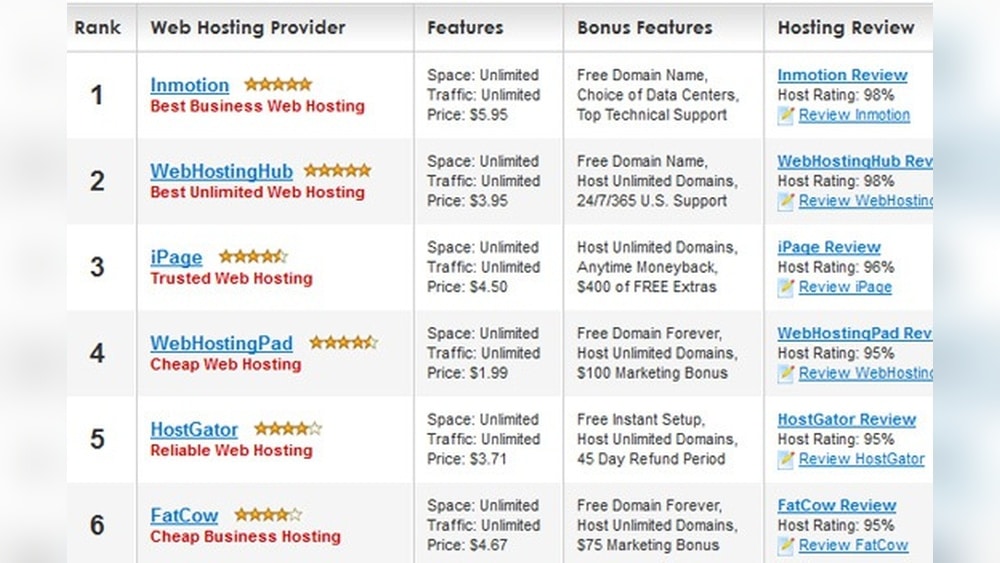
Finding the best web hosting is one of the most important choices you’ll make for your website. Whether you’re starting a blog, launching an online store, or building a business site, the hosting provider you choose affects your site’s speed, security, and reliability. With so many options, it’s easy to feel overwhelmed. Some companies offer cheap plans, while others focus on premium features. There are also specialized hosting types like WordPress hosting and cloud hosting. This guide will help you understand what web hosting is, how to choose the right provider, and which companies are the best in 2024. You’ll get clear explanations, real examples, and expert advice so you can make a confident decision.
What Is Web Hosting?
Web hosting is a service that stores your website’s files and makes them available on the internet. When someone types your domain name into their browser, your host delivers the site content to them. Without hosting, your website can’t be seen by anyone online.
There are different types of hosting:
- Shared hosting: Many websites share the same server. It’s cheap and easy, good for beginners.
- VPS hosting: Virtual Private Server. You get more resources, better performance, and control.
- Dedicated hosting: You rent an entire server. Great for big sites or businesses.
- Cloud hosting: Your site uses many servers. It’s flexible and handles traffic spikes well.
- Managed WordPress hosting: Special for WordPress sites. It’s optimized and includes updates.
Each type suits different needs and budgets. Shared hosting is enough for most small websites. If you want more speed or expect lots of visitors, consider VPS or cloud hosting.
How To Choose The Best Web Hosting
Before picking a host, think about your website goals and needs. Here are the key factors:
- Speed: Fast loading is vital. Slow sites lose visitors and rank lower in Google.
- Uptime: This is the percentage of time your site is online. Look for at least 99.9% uptime.
- Support: Good support helps you fix problems quickly. 24/7 live chat or phone is best.
- Security: Protection against hackers and malware. SSL certificates, backups, and firewalls matter.
- Ease of Use: A simple control panel saves time. Many hosts use cPanel or custom dashboards.
- Price: Compare cost and features. Cheap isn’t always better. Watch for hidden fees.
- Scalability: Can you upgrade easily as your site grows?
- Extras: Free domain, email, website builder, and other features.
Many beginners forget to check for scalability. If your site gets popular, you’ll need more resources. Switching hosts later can be hard, so plan ahead.
Best Web Hosting Providers In 2024
Below are the top hosting companies for all types of websites. Each has unique strengths. The right choice depends on your goals, budget, and technical skill.
1. Bluehost
Bluehost is one of the most popular hosting companies. It’s recommended by WordPress.org, which shows its quality and reliability.
- Speed: Average load time is around 600 ms, faster than many competitors.
- Uptime: 99.98%, which is excellent.
- Support: 24/7 chat and phone. Friendly and helpful.
- Features: Free domain for 1 year, SSL certificate, easy WordPress install.
- Price: Starts at $2.95/month for shared hosting.
Bluehost’s dashboard is simple, even for beginners. It includes a website builder and lets you upgrade to VPS or dedicated hosting as you grow. A non-obvious insight: Bluehost offers staging environments for WordPress sites, so you can test changes before going live.
2. Siteground
SiteGround is known for high performance and strong security. It’s especially good for WordPress and WooCommerce sites.
- Speed: Uses Google Cloud, SSD, and built-in caching. Load times average 450 ms.
- Uptime: 99.99%—almost perfect.
- Support: Award-winning 24/7 service.
- Features: Daily backups, free SSL, advanced security tools.
- Price: Starts at $3.99/month.
SiteGround’s custom dashboard is easy to use. You get automatic updates and staging for WordPress. A detail many miss: SiteGround limits the number of visits per month, not just storage, so check this if you expect high traffic.
3. Hostgator
HostGator is famous for affordable plans and unlimited resources. It’s a solid choice for small businesses and personal sites.
- Speed: Average load time is 750 ms, which is decent.
- Uptime: 99.97%.
- Support: 24/7 live chat and phone.
- Features: Unlimited storage and bandwidth, free website builder, SSL.
- Price: Starts at $2.75/month.
HostGator offers a 45-day money-back guarantee. It’s easy to scale up to VPS or dedicated hosting. One insight: HostGator’s email hosting is included, which is useful for professional communication.
4. Dreamhost
DreamHost is respected for transparent pricing and privacy. It’s another WordPress.org recommended host.
- Speed: Load times average 500 ms.
- Uptime: 99.96%.
- Support: 24/7 ticket system and live chat.
- Features: Free domain, SSL, unlimited traffic, daily backups.
- Price: Starts at $2.59/month.
DreamHost uses a custom control panel, which some find easier than cPanel. They offer a 97-day money-back guarantee, the longest in the industry. Many forget: DreamHost gives free WHOIS privacy with domains, protecting your personal info.
5. A2 Hosting
A2 Hosting is known for speed and developer-friendly features.
- Speed: Turbo servers deliver load times as low as 380 ms.
- Uptime: 99.95%.
- Support: 24/7 live chat, phone, and email.
- Features: Free SSL, SSD storage, staging, site migration.
- Price: Starts at $2.99/month.
A2 Hosting supports advanced technologies like PHP 8, Node.js, and SSH. It’s a good choice for tech-savvy users. Non-obvious: Their Turbo plans offer up to 20x faster speeds, but only select plans have this.
6. Inmotion Hosting
InMotion Hosting combines solid performance with business-friendly tools.
- Speed: Load times average 530 ms.
- Uptime: 99.98%.
- Support: 24/7 live chat, phone, and email.
- Features: Free SSL, backups, email accounts, website migration.
- Price: Starts at $2.49/month.
InMotion offers free site transfers and a drag-and-drop builder. Their data centers are in the US, which is better for American visitors. Many overlook: InMotion provides free advertising credits for Google and Bing.
7. Greengeeks
GreenGeeks is the leader in eco-friendly hosting.
- Speed: Load times average 470 ms.
- Uptime: 99.95%.
- Support: 24/7 live chat, phone, and email.
- Features: Free SSL, daily backups, unlimited storage, eco-friendly.
- Price: Starts at $2.95/month.
GreenGeeks matches 3x the energy they use with renewable energy credits. You get a free domain for 1 year. A unique insight: GreenGeeks offers free CDN integration, helping sites load faster worldwide.
8. Hostinger
Hostinger is famous for low prices and global data centers.
- Speed: Average load time is 480 ms.
- Uptime: 99.97%.
- Support: 24/7 live chat.
- Features: Free SSL, weekly backups, custom dashboard.
- Price: Starts at $1.99/month.
Hostinger’s hPanel is easy for beginners. They offer data centers in the US, Europe, and Asia. Many forget: Hostinger has a free website builder, useful for simple sites.
9. Godaddy
GoDaddy is the world’s largest domain registrar and offers hosting too.
- Speed: Average load time is 690 ms.
- Uptime: 99.94%.
- Support: 24/7 phone and live chat.
- Features: Free domain, SSL, email, website builder.
- Price: Starts at $5.99/month.
GoDaddy is easy for beginners but can be pricier than others. One insight: GoDaddy’s WordPress hosting includes automatic daily backups.
10. Kinsta
Kinsta is a premium managed WordPress host built on Google Cloud.
- Speed: Load times average 350 ms.
- Uptime: 99.99%.
- Support: Expert WordPress support 24/7.
- Features: Free SSL, CDN, staging, automatic scaling.
- Price: Starts at $35/month.
Kinsta is best for businesses and high-traffic sites. It’s expensive but offers top performance and security. Unique: Kinsta lets you choose from 29 global data centers for your site.
Comparison: Shared Hosting Vs Vps Vs Dedicated Hosting
Choosing the right hosting type is crucial. Here’s a simple comparison to help you understand the differences:
| Hosting Type | Best For | Price Range | Pros | Cons |
|---|---|---|---|---|
| Shared | Small websites, blogs | $2–$10/mo | Cheap, easy | Limited resources, slower |
| VPS | Growing sites, businesses | $15–$60/mo | More control, faster | More complex, higher cost |
| Dedicated | Large sites, eCommerce | $80–$300/mo | Full control, high speed | Expensive, needs tech skill |
Many beginners choose shared hosting because it’s cheap. But if you expect your site to grow fast, VPS hosting is a smarter long-term option.

Credit: wp101.com
Website Speed And Uptime: Why They Matter
Speed and uptime are two critical factors for any website. A slow site frustrates visitors and reduces sales or signups. Uptime measures how often your site is online; downtime can lose customers.
Google says 53% of mobile users leave a site if it takes more than 3 seconds to load. So, fast hosting is not just a luxury—it’s essential.
Here’s a quick comparison of average speed and uptime for the top hosts:
| Provider | Avg. Load Time | Uptime |
|---|---|---|
| Bluehost | 600 ms | 99.98% |
| SiteGround | 450 ms | 99.99% |
| HostGator | 750 ms | 99.97% |
| DreamHost | 500 ms | 99.96% |
| A2 Hosting | 380 ms | 99.95% |
| GreenGeeks | 470 ms | 99.95% |
| Hostinger | 480 ms | 99.97% |
| GoDaddy | 690 ms | 99.94% |
| Kinsta | 350 ms | 99.99% |
| InMotion | 530 ms | 99.98% |
Notice how Kinsta and SiteGround lead in both speed and uptime. These factors are often ignored by beginners who focus only on price.
Security Features To Look For
Website security is more important than ever. Hackers target all kinds of sites—big and small. Reliable hosts offer strong protections:
- SSL certificates: Encrypts data, required for trust and ranking.
- Daily backups: Lets you restore your site if something goes wrong.
- Firewalls: Blocks malicious traffic.
- Malware scanning: Finds and removes threats.
- DDoS protection: Prevents attacks that overload your site.
Many hosts offer basic security, but premium hosts like Kinsta and SiteGround include advanced features like automatic malware removal and two-factor authentication.
A tip: Don’t just rely on host security. Keep your site updated and use strong passwords.
Customer Support: Why It Counts
When your site has problems, fast help is crucial. Look for these support features:
- 24/7 live chat: Quick answers anytime.
- Phone support: Good for urgent issues.
- Email/ticket system: Useful for complex questions.
Some hosts, like Bluehost and SiteGround, offer support in multiple languages. Beginners often miss this detail, which can be helpful if English is not your first language.
Hosting Extras That Make A Difference
Extras can make hosting easier and more valuable:
- Free domain: Saves money.
- Website builder: Lets you create a site without coding.
- Email hosting: Professional email addresses for your domain.
- CDN: Content Delivery Network speeds up your site worldwide.
A mistake beginners make is ignoring these extras. For example, if you want a business email, choose a host that includes email hosting.
Common Mistakes When Choosing Web Hosting
Many new website owners make these errors:
- Choosing only by price: Cheap plans often lack features or support.
- Ignoring speed and uptime: Slow or offline sites hurt your business.
- Not checking scalability: You might need to upgrade as your site grows.
- Missing hidden costs: Renewal prices, add-ons, and migration fees can surprise you.
- Skipping security: Weak security leaves your site open to attack.
Always read the details and reviews before choosing. Try to test the host’s support by asking a question before you sign up.
How To Move Your Website To A New Host
If your current host is slow or unreliable, moving to a new provider can help. Here’s how:
- Backup your site: Save all files and databases.
- Choose your new host: Pick one with free migration if possible.
- Transfer files and database: Use FTP or the host’s migration tool.
- Update DNS: Point your domain to the new host’s servers.
- Test your site: Check everything before canceling your old host.
Many hosts, like SiteGround and A2 Hosting, offer free migration. It’s safer and easier than doing it yourself.
Real-world Examples
- A small business owner chose HostGator for price but later moved to SiteGround for better speed. Sales increased by 20% after switching.
- A blogger with a growing audience upgraded from Bluehost shared hosting to VPS. Her site handled more visitors without crashing.
- An online store owner used Kinsta for security and uptime. He avoided a costly hack that affected his competitor.
These examples show that the right host can make a big difference.
Data: Hosting Market Share In 2024
The web hosting industry is huge. Here’s a quick look at the market share:
| Provider | Market Share (%) |
|---|---|
| GoDaddy | 14.7 |
| Bluehost | 6.6 |
| HostGator | 3.9 |
| SiteGround | 2.8 |
| DreamHost | 1.9 |
| Hostinger | 1.7 |
| Others | 68.4 |
You can see GoDaddy is the biggest, but others offer better performance and features.

Credit: cybernews.com
Which Host Is Best For You?
The best web hosting depends on your site’s needs:
- For blogs and small sites: Bluehost, Hostinger, or DreamHost are great.
- For business and eCommerce: SiteGround, InMotion, or Kinsta.
- For eco-friendly hosting: GreenGeeks.
- For developers: A2 Hosting.
- For global sites: Hostinger (multiple data centers).
Don’t just choose the cheapest option. Think about speed, support, security, and extras.
If you want more in-depth comparisons and stats, check out PCMag’s expert reviews.
Frequently Asked Questions
What Is The Difference Between Shared And Vps Hosting?
Shared hosting puts many websites on one server. It’s cheap but has limited speed and resources. VPS hosting gives you part of a server with more power and control. It’s faster and handles more traffic but costs more.
Can I Upgrade My Hosting Plan Later?
Yes. Most hosts let you upgrade as your site grows. You can move from shared to VPS or cloud hosting easily. Look for a host that makes upgrading simple.
How Important Is Customer Support?
Very important. If your site goes down or you have problems, fast support is essential. Choose a host with 24/7 support and good reviews.
Do I Need A Domain Name With My Hosting?
You need a domain name for your website. Many hosts offer a free domain for the first year. You can also buy a domain separately.
What Is An Ssl Certificate And Why Do I Need It?
An SSL certificate secures your site and encrypts data. It’s required for Google ranking and builds trust with visitors. Most hosts include SSL for free.
Choosing the best web hosting is a big step. With the right provider, your website will be fast, secure, and reliable. Use the insights and tips in this guide to make a smart choice for your needs. A good host helps your site grow and succeed, so take time to compare and test before you decide.

Credit: www.topdevelopers.co