

Choosing a web hosting provider is a big step for anyone who wants a website, whether you’re launching a blog, an online store, or a business site. Two of the biggest names in this space are GoDaddy and Bluehost. Both are popular, have been around for years, and serve millions of users worldwide. But which one is better for your needs? To answer that, you need a clear, honest, and detailed comparison—not just a list of features, but real insights into what matters most.
If you’re not a native English speaker, some of the language around web hosting can be confusing. This article will explain everything in simple, clear English. We’ll compare GoDaddy and Bluehost on all the important points: pricing, performance, ease of use, customer support, security, and more. You’ll see real examples, useful data, and non-obvious tips that many beginners miss. By the end, you’ll feel confident choosing the right host for your website.
Company Background And Market Position
GoDaddy started in 1997 and has become one of the most recognized names in web hosting and domain registration. It manages over 84 million domain names and serves more than 20 million customers worldwide. GoDaddy is especially famous for its huge marketing campaigns and for making domain registration easy.
Bluehost, founded in 2003, is also a major player. It’s officially recommended by WordPress. org, which gives it a strong reputation among bloggers and small businesses. Bluehost hosts over 2 million websites and is part of Endurance International Group, which owns other hosting brands too.
While both companies are US-based and global, GoDaddy is generally seen as a domain registrar first and a web host second. Bluehost is mostly known for its hosting services, especially shared and WordPress hosting. This difference shapes their products and customer experience.
Pricing And Plans
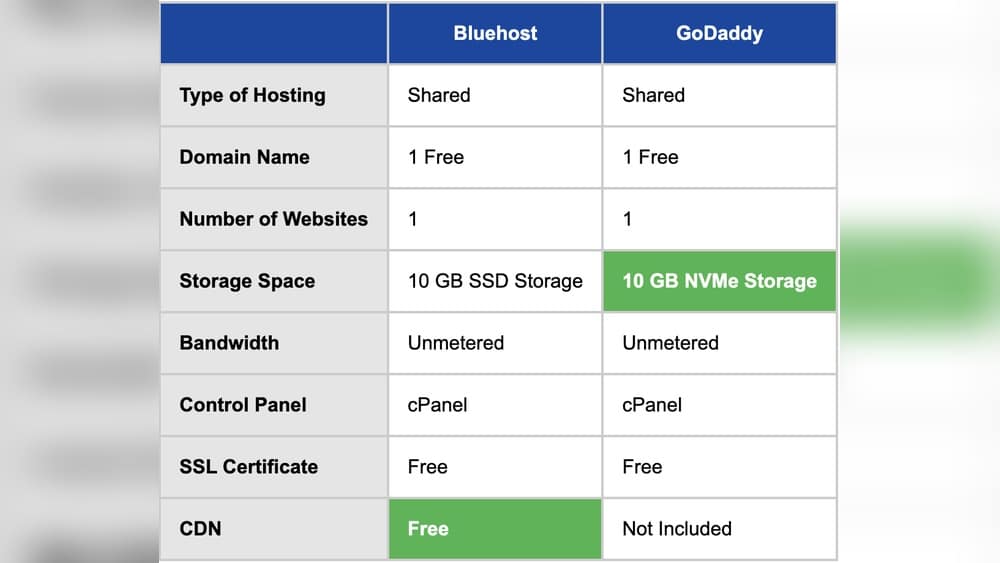
Understanding pricing is key, but it can be tricky. Both GoDaddy and Bluehost offer several types of hosting: shared, WordPress, VPS, dedicated, and more. Each type has different prices, and both companies use low “introductory” rates that go up after your first term. Here’s a direct comparison of the most popular shared hosting plans:
| Host | Basic Plan (First Term) | Renewal Price | Websites | Storage | Free Domain? |
|---|---|---|---|---|---|
| GoDaddy | $5.99/mo | $9.99/mo | 1 | 25 GB | Yes (1 year) |
| Bluehost | $2.95/mo | $9.99/mo | 1 | 10 GB | Yes (1 year) |
A few important points:
- The first-term price is usually for 12, 24, or 36 months paid up front. Month-to-month prices are much higher.
- Renewal prices are higher, and many beginners are surprised by this.
- Both give you a free domain for the first year, but you’ll pay for it in later years.
When looking at other plan types (like VPS or dedicated), both hosts offer competitive prices, but Bluehost often bundles more features in its lower-cost plans. GoDaddy sometimes charges extra for things like backups and SSL certificates, which can raise your real cost.
Non-obvious insight: Always check *total cost of ownership* for at least two years, including all add-ons you need (like SSL, backups, email). Many users pick the cheapest plan, then realize they need extra features that cost more.

Credit: blog.templatetoaster.com
Features And Inclusions
What you get for your money matters as much as the price. Here’s how the key features of GoDaddy and Bluehost compare for shared hosting:
| Feature | GoDaddy | Bluehost |
|---|---|---|
| Free SSL Certificate | No (paid) | Yes (included) |
| Website Builder | Yes (built-in) | Yes (basic) |
| Free Email | 3 months free, then paid | Yes (included) |
| Automatic Backups | No (paid add-on) | Yes (on higher-tier plans) |
| Storage | 25 GB (basic) | 10 GB (basic) |
| Bandwidth | Unmetered | Unmetered |
| CDN | Paid add-on | Free (basic) |
| One-Click WordPress Install | Yes | Yes |
Some features that look “free” are only free for a short time or require upgrades. For example, GoDaddy’s basic plan does not include a free SSL certificate, which is important for website security and Google rankings. Bluehost includes SSL with all plans.
Non-obvious insight: SSL (Secure Sockets Layer) is now essential, not optional. Google penalizes sites without it, and browsers show “Not Secure” warnings. Always make sure your hosting plan gives you a free SSL.
Performance And Speed
A fast website is important for keeping visitors happy and ranking well in Google. Both GoDaddy and Bluehost claim to have good performance, but real-world results can be different. Here’s how they stack up on performance:
- Server Locations: GoDaddy has data centers in North America, Europe, and Asia. Bluehost mainly uses US-based data centers. If your audience is global, GoDaddy may offer better server location options.
- Speed Tests: Independent tests often show Bluehost loading WordPress sites in about 1.2-1.8 seconds, while GoDaddy averages 1.5-2.1 seconds. Actual speed varies by website type and content.
- Uptime Guarantee: GoDaddy promises 99.9% uptime, and real uptime is close to this. Bluehost also claims 99.9% uptime, with similar real results.
Website speed can depend on many factors, such as the size of your images, your theme, and plugins. Both hosts allow you to use caching plugins and CDNs (Content Delivery Networks), but Bluehost includes a basic CDN for free, while GoDaddy charges extra.
Example: If you’re running a small business website targeting US customers, Bluehost’s US-based servers and free CDN give you a speed edge out of the box.
Ease Of Use And Control Panel
For beginners, the control panel and setup process can make a big difference. Both GoDaddy and Bluehost use a version of the cPanel control panel, but they customize it.
- GoDaddy: Uses a custom dashboard for account management, and a more basic version of cPanel for website management. Their dashboard is clean but sometimes hides advanced options, which can be frustrating for experienced users.
- Bluehost: Offers a modern, beginner-friendly dashboard on top of cPanel. Their interface is designed to make WordPress setup, email, and backups easy for non-technical users.
Setting up a WordPress site on Bluehost is very simple, with guided steps. GoDaddy also offers one-click installs, but the process can feel less smooth, especially when adding extra features.
Practical tip: Try a host’s demo dashboard before buying, if possible. A confusing control panel can waste a lot of your time.
WordPress Hosting
WordPress is the world’s most popular website platform. Both GoDaddy and Bluehost offer special WordPress hosting plans, but there are differences that matter:
- Bluehost is officially recommended by WordPress.org. This means WordPress trusts their hosting for performance, compatibility, and support.
- GoDaddy offers managed WordPress plans, but it’s not on the official recommended list.
Here’s a direct comparison of WordPress hosting features:
| Feature | GoDaddy (Managed WP) | Bluehost (WP Hosting) |
|---|---|---|
| Free SSL | Yes (on all WP plans) | Yes |
| Automatic Updates | Yes | Yes |
| Staging Environment | Only on high-tier plans | Included |
| Daily Backups | Yes | Yes |
| Malware Scanning | Paid add-on | Included |
| Optimized Performance | Yes | Yes |
If you want to build a WordPress site, Bluehost’s deeper integration, automatic updates, and staging environment (for testing changes) are useful advantages, especially for beginners.

Credit: webhostingcat.com
Customer Support
Reliable customer support is critical, especially if you’re new to web hosting or run into problems. Here’s how GoDaddy and Bluehost compare:
- GoDaddy: Offers 24/7 support by phone and live chat. Support is available in many languages, which is helpful for non-English speakers. However, wait times can be long during busy hours, and some users report being pushed to buy extra services.
- Bluehost: Also provides 24/7 support via chat and phone. Their support team is known for being friendly and knowledgeable, especially with WordPress issues. Response times are generally faster than GoDaddy.
Both hosts have large online knowledge bases. Bluehost’s help center is a bit easier to search and has more beginner-focused guides.
Non-obvious insight: If you need help outside regular US business hours, check if your host’s live chat is truly 24/7 and how quickly they reply. Try contacting support with a test question before you buy—you’ll see the real quality.
Security Features
Website security is a top concern for anyone running a site. Here’s how both hosts handle security:
- GoDaddy: Basic plans do not include malware scanning, firewalls, or backups. These are paid add-ons. Free SSL is not included with the cheapest plans. Two-factor authentication (2FA) is available for accounts.
- Bluehost: Includes free SSL, basic malware protection, and daily backups on higher-tier plans. 2FA is available, and advanced spam filtering is included for email accounts.
Both hosts monitor their servers for threats, but Bluehost gives you more free security features, especially if you pick a mid-level plan.
Practical tip: Never skip SSL or backups to save money. Recovering from a hack or data loss is far more expensive and stressful.
Email And Domain Services
Both GoDaddy and Bluehost offer email hosting and domain registration, but with some differences:
- GoDaddy: The world’s largest domain registrar. You get a free domain for the first year with most hosting plans. Email is free for 3 months, then requires a paid Microsoft 365 subscription.
- Bluehost: Also gives a free domain for the first year. Free email accounts are included with hosting, and you can create addresses like you@yourdomain.com at no extra cost.
If you want to keep all your domains and email in one place, GoDaddy is convenient. But Bluehost’s included email saves money in the long run.
Non-obvious insight: Many users don’t realize they can buy a domain from one provider (like GoDaddy) and host their website somewhere else (like Bluehost). You’re not “locked in” to using the same company for both.
Website Migration
Moving your website from another host can be stressful. Here’s how GoDaddy and Bluehost help:
- GoDaddy: Charges a fee for migrating your site, unless you do it manually. Their migration tool supports WordPress, but advanced sites may need manual work.
- Bluehost: Offers free WordPress migration for one site if you sign up for a new account. They also provide paid migration for more complex sites.
If you’re moving an existing site, Bluehost’s free migration can save time and money.

Credit: webhostingbuddy.com
Advanced Hosting Options
As your website grows, you might need more power. Both hosts offer VPS (Virtual Private Server) and dedicated hosting:
- GoDaddy: VPS plans start at $9.99/month (promo rate), with managed and unmanaged options. Dedicated servers from $129.99/month. Good for business sites needing more control.
- Bluehost: VPS plans start at $29.99/month, dedicated servers from $89.98/month. Bluehost’s VPS is optimized for WordPress and comes with more resources included.
For most beginners, shared or WordPress hosting is enough. But if you expect high traffic, check the upgrade options in advance.
User Reviews And Reputation
Looking at customer reviews gives useful insight. Both GoDaddy and Bluehost have mixed reviews online, with some common themes:
- GoDaddy: Praised for its easy domain management, but criticized for upselling and extra fees for features like SSL and email. Some users report slow support at busy times.
- Bluehost: Generally rated higher for WordPress hosting, friendly support, and simple setup. Some users report slower speeds on the cheapest plans.
Independent review sites like Trustpilot and G2 show Bluehost scoring around 4. 0/5, while GoDaddy often scores around 3. 8/5. Remember, unhappy users are more likely to leave reviews, so read multiple sources.
Pros And Cons At A Glance
Here’s a quick overview of the main strengths and weaknesses:
GoDaddy Pros:
- Largest domain registrar, easy domain management
- Many global data centers
- Wide range of products (domains, hosting, email, marketing)
- 24/7 phone support in many languages
GoDaddy Cons:
- Many features cost extra (SSL, backups, email)
- Aggressive upselling
- Basic hosting performance is average
- Site migration isn’t free
Bluehost Pros:
- Officially recommended by WordPress.org
- Free SSL and email on all plans
- Simple, beginner-friendly dashboard
- Free WordPress site migration
- Good value, especially for small businesses
Bluehost Cons:
- Data centers mainly in the US
- Cheapest plans have less storage
- Some users report slower speeds on big sites
Which Should You Choose?
If your top priority is easy domain management and you want to keep everything (domains, hosting, email) with one provider, GoDaddy is a strong choice. It’s also a good fit if you need global data centers or support in your local language.
If you’re starting a WordPress site, want the best value for money, and need good support, Bluehost is hard to beat. You get more features included, simpler setup, and free SSL/email without extra charges.
Many beginners make the mistake of only looking at the first-year price. Always look at renewal costs and what’s included. The “cheaper” host can end up costing more if you need to add SSL, backups, or email later.
For most small businesses, bloggers, and new website owners, Bluehost offers a better starting point, especially for WordPress sites. But if you need advanced domain tools or global reach, GoDaddy may be worth the extra cost.
If you want to see how these hosts compare to others, you can read more at the official Web Hosting Service Wikipedia page.
Frequently Asked Questions
What Is The Main Difference Between Godaddy And Bluehost?
The main difference is that GoDaddy is best known for domain registration and has a wider range of internet services, while Bluehost specializes in web hosting and is officially recommended by WordPress.org. Bluehost usually includes more features for free in its hosting plans, especially for WordPress users.
Is Bluehost Faster Than Godaddy?
In most independent speed tests, Bluehost is slightly faster than GoDaddy for WordPress websites, especially when using its free CDN. However, real speed depends on your website’s size, content, and visitors’ location. For global sites, GoDaddy’s data centers may help.
Which Host Is Better For WordPress?
Bluehost is generally better for WordPress hosting. It is recommended by WordPress.org and includes free SSL, automatic updates, and a staging environment. GoDaddy also offers managed WordPress hosting, but some features cost extra.
Can I Transfer My Domain From Godaddy To Bluehost?
Yes, you can transfer your domain from GoDaddy to Bluehost (or vice versa) at any time. The process is simple: unlock your domain at GoDaddy, get the transfer code, and start the transfer at Bluehost. Both companies have guides to help you.
Which Company Has Better Customer Support?
Bluehost is usually rated higher for customer support, especially for WordPress issues. Both offer 24/7 live chat and phone support, but Bluehost’s agents are often faster and more helpful. GoDaddy offers more languages and local support in some countries.
Choosing between GoDaddy and Bluehost is not always simple, but with the facts, features, and hidden details explained above, you can make a confident decision for your website’s future.